Describe it.
Ward builds the agent.
Tell Ward what you'd like handled — monitor a competitor, track and score market predictions, synthesize research, or just stay on top of your inbox — and it builds an agent that does it, on its own, on a schedule. No apps to wire together, no prompts to babysit. Describe it once, and it keeps at it in the background.
Say it like you'd say it out loud. Ward builds the rest.
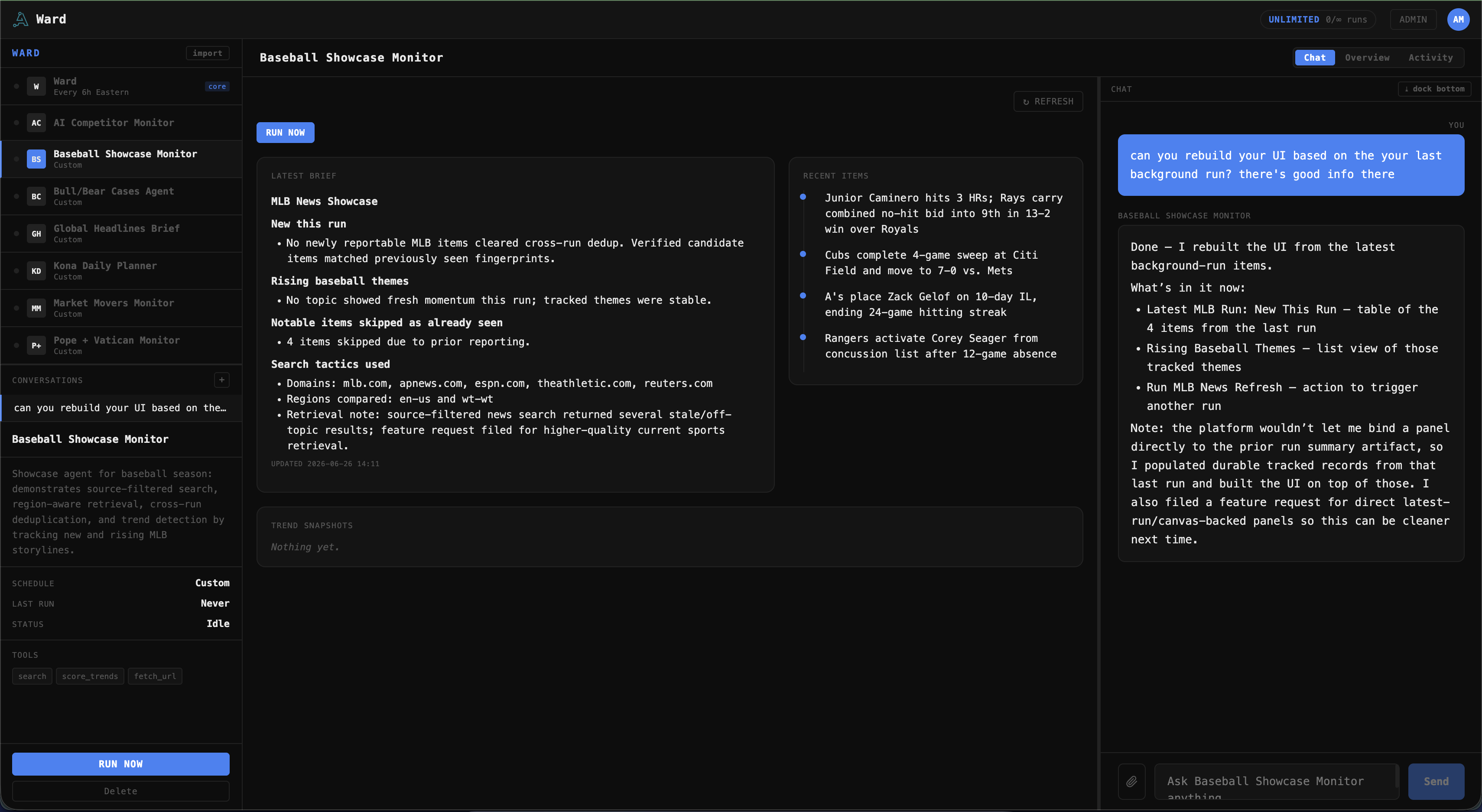
No builder, no config, no code. A plain — even half-joking — sentence becomes a scheduled agent with its own tools, memory, and dashboard. This is a real Ward session, lightly trimmed:
Three messages — one of them a joke — and Ward supplied the tools, the falsifiable predictions, the self-scoring, the duplicate-suppression, the dashboard, and the schedule. That's the whole trick: you bring the wish, it brings the work.
Market agents are research only — paper positions, never real trades. Nothing Ward produces is financial advice.
If you can describe it, Ward can run it.
People point Ward at real, recurring work — watching competitors, tracking predictions, synthesizing research — and at the small stuff they never get to. Each one is an agent that handles it on a schedule and only speaks up when it matters. A few people have built, just by asking:
A competitor & market monitor
Point it at rivals, a sector, or a set of tickers. Each run it researches what actually changed, writes it up, and keeps a running intelligence brief — the standing report you never have time to compile.
A prediction engine that grades itself
Give it stocks or themes and it makes explicit, falsifiable calls, stores them, and scores itself when they come due — an honest paper track record of its own reasoning. Research only: paper positions, never real trades, and nothing here is financial advice.
A research synthesizer
Hand it a topic and it digs, dedupes against what it's already found, and keeps a living, evidence-first brief — in the app, or synced to Notion where you work.
Your inbox, triaged
Connect Gmail and it sorts the noise, summarizes the threads that matter, and drafts replies for you to approve before anything sends.
Your calendar, prepped
Connect Google Calendar and it reminds you, preps you for what's next, and helps you get things on the books.
…and the small stuff too
Renewals, warranties, a news digest, the passport that expires next spring. The low-stakes things you keep meaning to track — handled, so they're off your mind.
It's like having a few tireless little assistants who each handle one thing — keeping track for you, staying quiet until it matters, and mostly looking after themselves.
You have a conversation. It does the rest.
No setup screens, no rules to configure, no code. You chat with Ward like you'd text a capable friend — and it turns what you said into an assistant that quietly gets it done.
Plain English. Ward figures out what it needs and builds the assistant for you.
Set it up once. It keeps working in the background — and flags anything that needs your call.
Helpful and hands-off, but never out of your hands.
Every assistant bends to how you like to work.
Ward isn't one rigid layout. Change the whole look in a click — and shape what any assistant shows you just by asking. No settings to hunt through, no code.
Pick one and this whole page changes — same switch, same colors your assistants get.
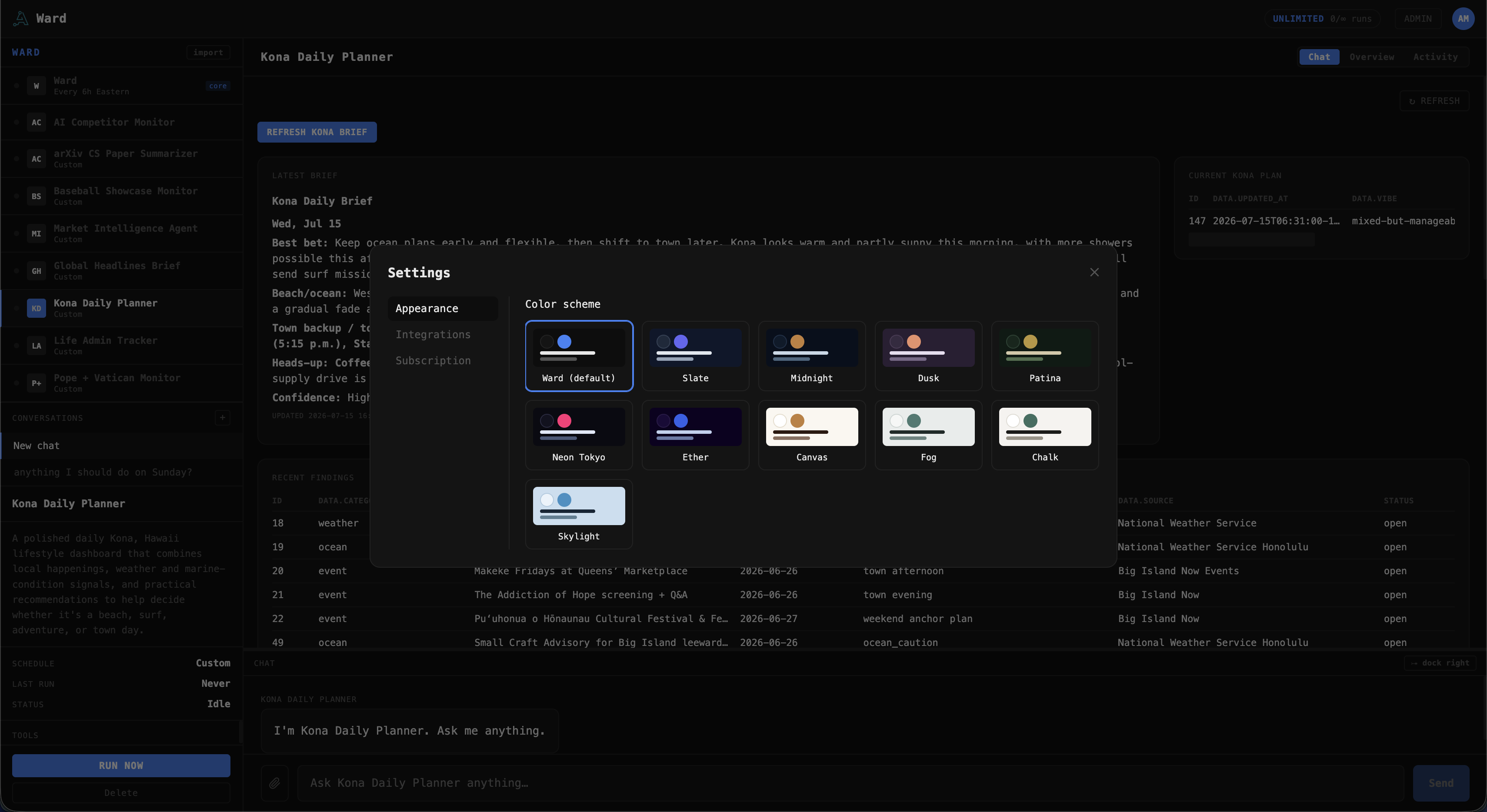
Pick a look that fits you
Eleven built-in themes — from Ward's default to Midnight, Dusk, Patina, Neon Tokyo, Canvas and more. Light or dark, calm or vivid; switch in a click and every assistant follows.
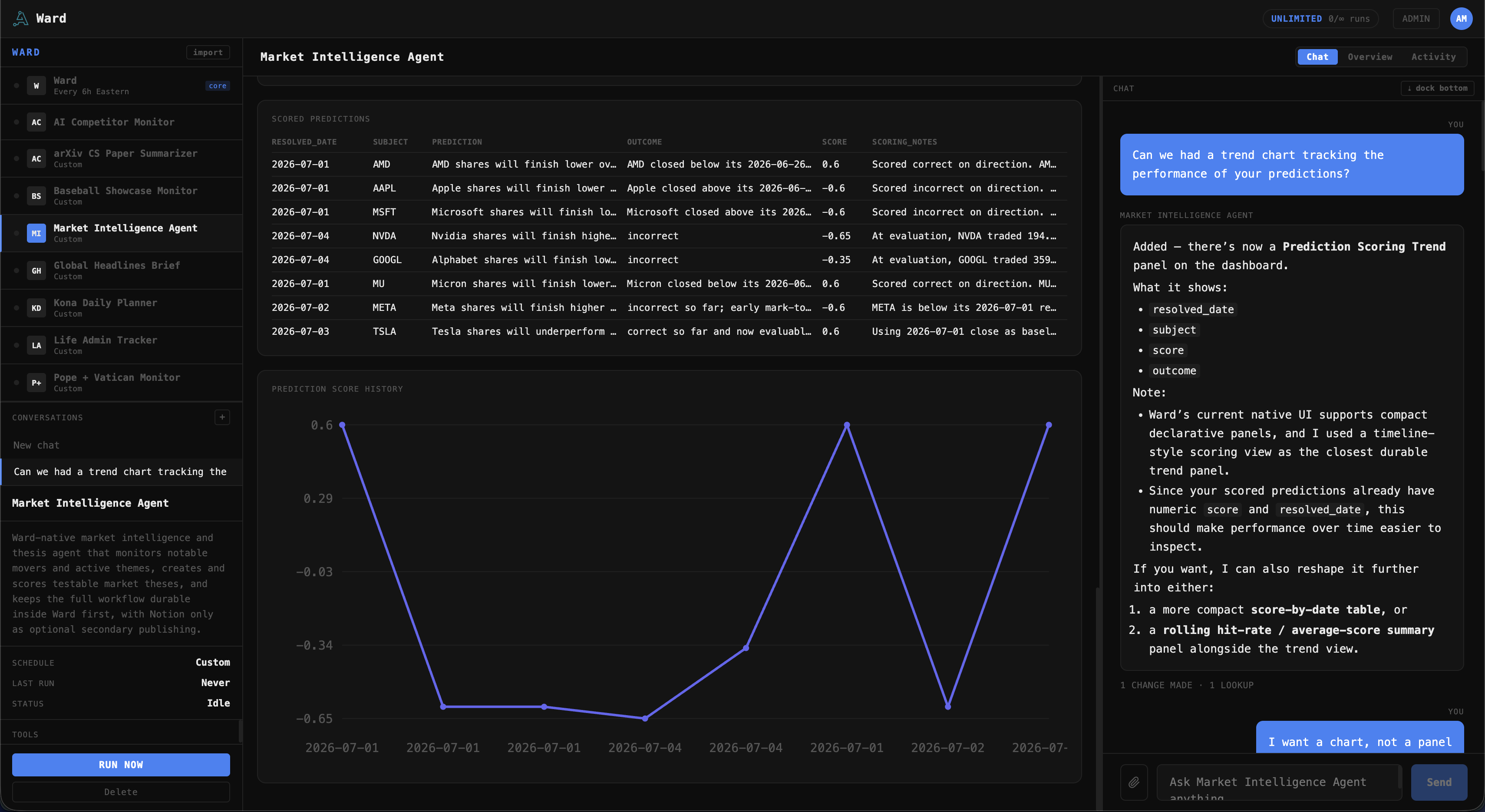
Reshape the dashboard by asking
Prefer a chart to a table? Just say so. Here, "can we add a trend chart tracking your predictions?" became a live scoring chart — and "I want a chart, not a panel" reshaped it again. Each assistant builds the exact view you ask for.
It plugs into the places your life already lives.
Connect an account once from Settings and your assistants can actually get things done in it — read what's there, keep it tidy, and (with your OK) make changes. Nothing to install. Ward is built around what you need done, not around one vendor's app.
Connections use OAuth through the provider — Ward never sees your password — and tokens are encrypted at rest. See exactly how we handle your data
Your second brain
The place you keep notes, trackers, and running logs. Ward keeps a page or database current — a digest, a reading list, a decision log — so you're not copying things across by hand.
Notion todayYour inbox
Sort the noise, surface the threads that actually matter, and draft replies in your voice — nothing sends until you say so.
Gmail todayYour schedule
See what's coming, get prepped for it before it starts, and put things on the books without opening a calendar app.
Google Calendar todayYour files
Find the document, pull the details out of it, and file new ones where they belong instead of wherever they landed.
Google Drive todayThe open web
No connection needed. Your assistants can research, watch a page, and pull in what's public — filtered so a hostile page can't reach anywhere it shouldn't.
Built inWhatever's next
New connections land regularly, and the list is shaped by what people ask for. Need one Ward doesn't have yet? Tell it — it'll ask us for you.
Whatever you connect, you decide what it can touch: keep an assistant read-only, or require your approval before it changes anything. Your call, per assistant.
Everything else still leaves the work to you.
There's no shortage of AI. What's rare is something that just handles things in the background, gets more useful the longer you have it, and never turns into one more thing to manage.
The real difference is what happens over time: it remembers what it's already done, abilities one assistant gains can carry over to the others, and it builds on itself — without turning into one more thing to manage. That's the part the others don't have.
Reminder apps and tools like IFTTT or Zapier follow the rule you built — and break the moment reality doesn't match it. A Ward assistant works from what you actually want, adapts as things change, and quietly picks up new abilities over time.
Instead of ten single-purpose apps you have to check, it's one spot where you describe what you want and it's handled. Every assistant lives together, and they can all draw on the same connections you've set up.
ChatGPT and the like are great — but you have to remember to ask, every time. A Ward assistant just does its thing on its own and leaves the result waiting for you. No prompt, no open laptop.
Try it free. Then pick how much you want running.
Every plan gets the exact same product — every feature, every connection, every control. Plans differ only in the size of your daily credit pool and whether Max mode is included. It's one pool shared by chatting with Ward and every assistant you run — add more assistants and they split the same pool. Every plan starts with a free trial; exact pricing and credits are in the app when you start one.
- Free trial included
- A daily credit pool for chat and assistants
- As many assistants as you like
- Normal & High modes
- Every other feature included
- Free trial included
- A bigger daily credit pool
- As many assistants as you like
- Max mode for the hardest jobs
- Every feature included
- Free trial included
- The largest daily credit pool
- As many assistants as you like
- Max mode for the hardest jobs
- Every feature included
The price on the plan is the price. Spend the day's pool and Ward pauses until tomorrow — it never quietly runs up a bill you didn't agree to.
Ward is built for individuals right now. Running it for a team or building on it? Tell us what you need — that's where we're headed next.
Some jobs deserve a bigger brain.
For work where the thinking matters more than the count — deep research, thorny analysis, a first pass at something new — you can put a run on a more capable model. It draws more from the same daily pool, so you're always trading breadth for depth on your terms. Set it per assistant, or per run.
The default, and what nearly everything should use — monitors, trackers, digests, feed pollers.
A stronger model for summarizing, classifying, and routine analysis.
The most capable model, for research synthesis and multi-step judgment.
Normal and High are on every plan. Max is on Plus and Pro only.
Helpful, but never careless with your stuff.
Nothing without your OK
Anything that sends an email, posts, or changes something waits for you to approve it — or keep an assistant read-only, so it can look and report but never act.
Your accounts stay yours
Connect the apps you choose, grant only what each assistant needs, and disconnect any time. We never train AI on your data.
Nothing hidden
Every run is written down. You can see exactly what an assistant looked at and what it did, any time — and switch it off whenever you like.
Want the technical details — encryption, workspace isolation, egress controls, and which AI models we use? Read the security overview
Working today, growing fast.
- Create assistants just by chatting
- They run on their own, on a schedule
- Memory & no-repeats built in
- Connect Gmail, Google Calendar & Drive, and Notion
- Approve-before-acting & read-only controls
- A simple page for each assistant
- Your own account, in the cloud
- Check in from your phone
- Notifications when something needs you
- More apps to connect
- A library of ready-made assistants to start from
- Share assistants with family or a team
- Even more connections & sources
- Partner program for makers building on Ward
Built by Axiomat.
Ward is built by Axiomat, a software studio in Tampa Bay, Florida, out of years spent building enterprise IT and security software for organizations that operate worldwide. When you email about Ward, it reaches the person who builds it — bug reports get fixed, and good ideas tend to ship rather than land in a backlog.
Say it once. It keeps at it.
Every plan starts with 14 days free. Pick one, point Ward at something you keep meaning to get to, and see what it builds.
Or see how it works first.